328 条提示词 · 每日更新 · 完全免费

AI 提示词库

汇集全球创作者的精选图像、视频与建站提示词。复制任意一条,替换主体或风格,即可用最新模型生成。

共 34 条

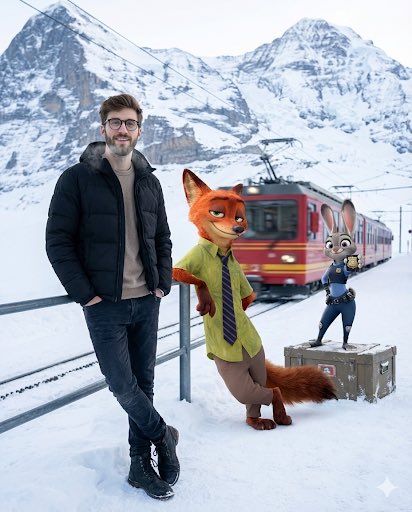
Cinematic Winter Travel Scene with Zootopia Characters

Cinematic Winter Travel Scene with Zootopia Characters

A cinematic winter travel moment set at a quiet Alpine mountain station just after snowfall. A young man stands near the edge of a snow-dusted platform, wearing a matte black puffer jacket over a neutral sweater, dark jeans, and winter boots. His posture is relaxed, hands in pockets, breath faintly visible in the cold air, with a calm, confident expression and natural, realistic skin texture. Beside him, {argument name="animated character 1" default="Nick Wilde from Zootopia"} leans against a metal railing, hands casually folded, wearing his signature green shirt and striped tie, giving a knowing side-smirk as if mid-conversation. A few steps away, {argument name="animated character 2" default="Judy Hopps"} stands atop a snow-covered luggage crate, adjusting her blue police uniform with an upbeat, alert expression, ears slightly raised. In the background, towering snow-covered Alpine peaks fade into soft atmospheric haze. A red mountain train slowly departs the station, leaving subtle motion blur and a sense of journey. Cold winter daylight, soft diffused light reflecting off the snow, realistic shadows grounded in the environment. Ultra-detailed textures, crisp winter air, cinematic depth of field. Photorealistic human seamlessly blended with high-quality animated characters. Travel-film aesthetic, emotionally warm yet minimal, high resolution, 4:5 aspect ratio.

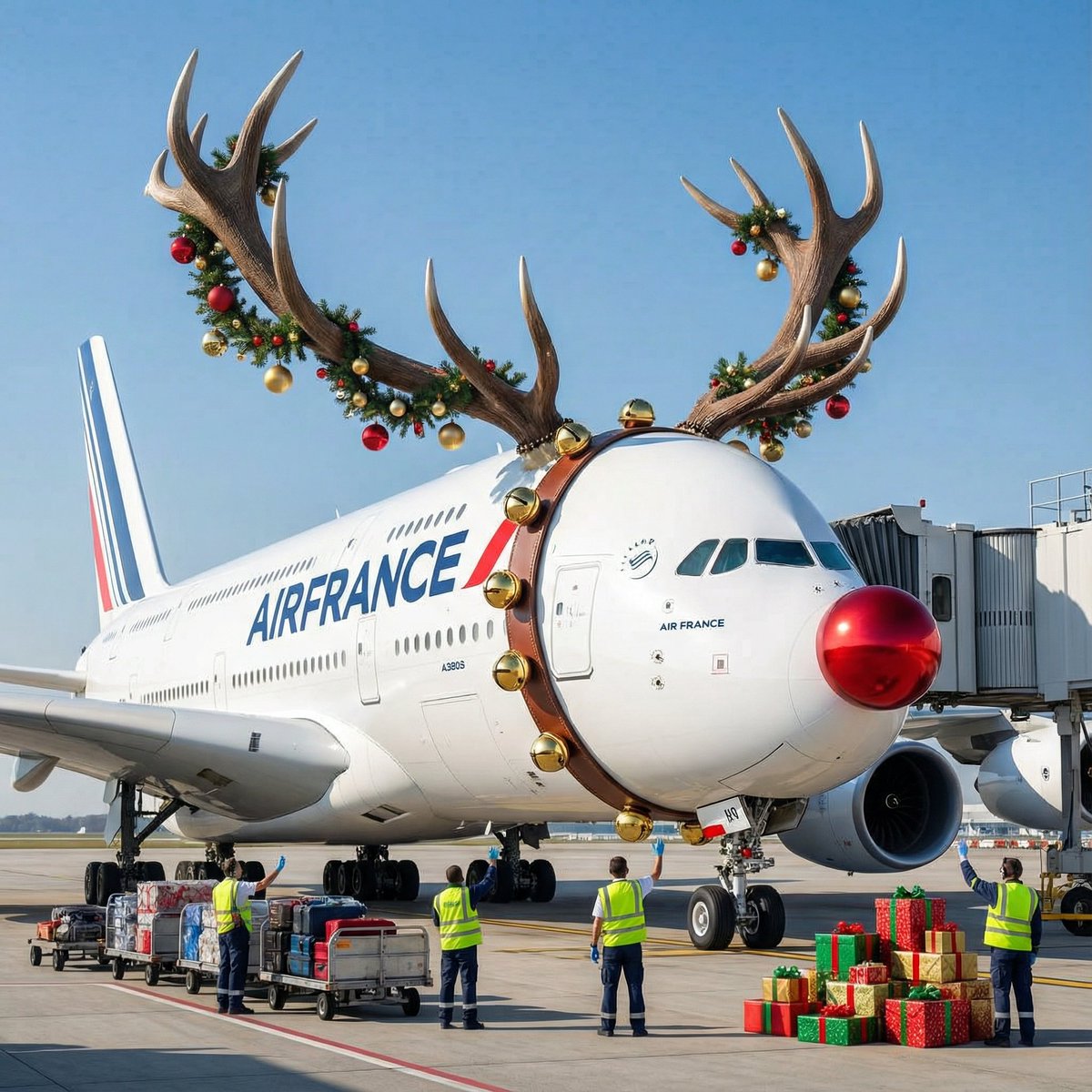
Air France ad fix prompt

Air France ad fix prompt

Air France A380 flying over Paris at night, futuristic neon lights, cinematic, dramatic lighting, high detail, 8k, photorealistic, wide shot, {argument name="style" default="cyberpunk"}, unreal engine, octane render, volumetric lighting, deep shadows, {argument name="color scheme" default="blue and orange"}, high contrast, sharp focus, {argument name="mood" default="epic"}

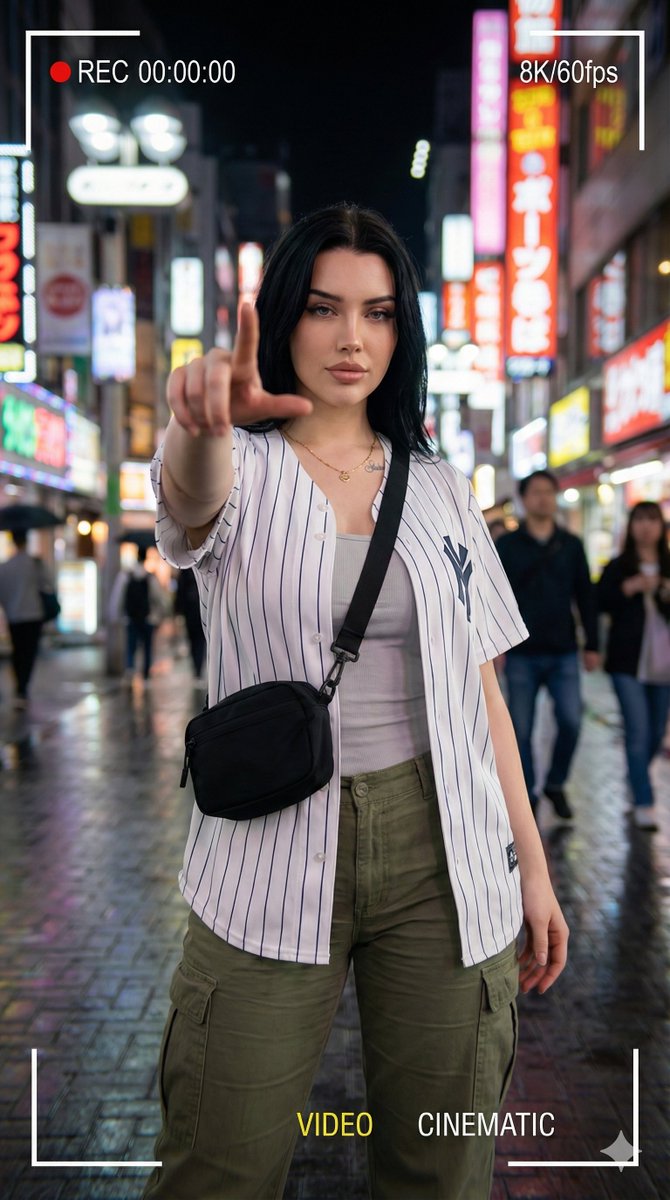
Hyper-realistic Cinematic Portrait with Neon Urban Aesthetic

Hyper-realistic Cinematic Portrait with Neon Urban Aesthetic

{ "request_id": "portrait_neon_urban_001", "configuration": { "model": "v6. 0_or_latest", "output_settings": { "dimensions": { "width": 1080, "height": 1920, "aspect_ratio": "9:16", "target_resolution": "64K DSLR" } } }, "scene_composition": { "subject": { "entity": "Young woman", "pose": "Standing confidently", "action": "Extending index finger forward toward camera lens", "interaction": "Dynamic gesture / POV interaction", "wardrobe": { "outerwear": "{argument name="outerwear color" default="dark crimson red"} striped baseball-style shirt", "undergarment": "Light inner shirt", "bottoms": "Cargo pants", "accessories": [ "Necklace", "Crossbody bag" ] } }, "environment": { "location": "Urban street", "time_of_day": "Night", "ambience": "Neon-lit", "background_elements": [ "Colorful city lights", "Blurred passersby" ] }, "cinematography": { "camera": { "perspective": "Wide-angle", "depth_of_field": "Soft bokeh", "motion": "Slight motion blur" }, "lighting": { "style": "Cinematic", "primary_sources": ["cyber punk street lights", "City glow"] }, "ui_overlay": { "enabled": true, "aesthetic": "Smartphone video recording", "on_screen_elements": [ "REC 00:00:00", "8K/60fps", "Frame brackets", "VIDEO indicator", "CINEMATIC indicator" ] } } }, "technical_rendering": { "style": "Hyper-realistic", "engines": [ "Octane Render", "Unreal Engine 5" ] }, "negative_prompt": { "stylistic_exclusions": [ "cartoon", "illustration", "anime" ], "quality_exclusions": [ "low quality", "pixelated", "blurry" ], "anatomical_exclusions": [ "bad anatomy", "deformed hands", "extra fingers", "missing limbs", "bad proportions" ], "branding_exclusions": [ "watermark (except for requested UI overlays)" ] } }

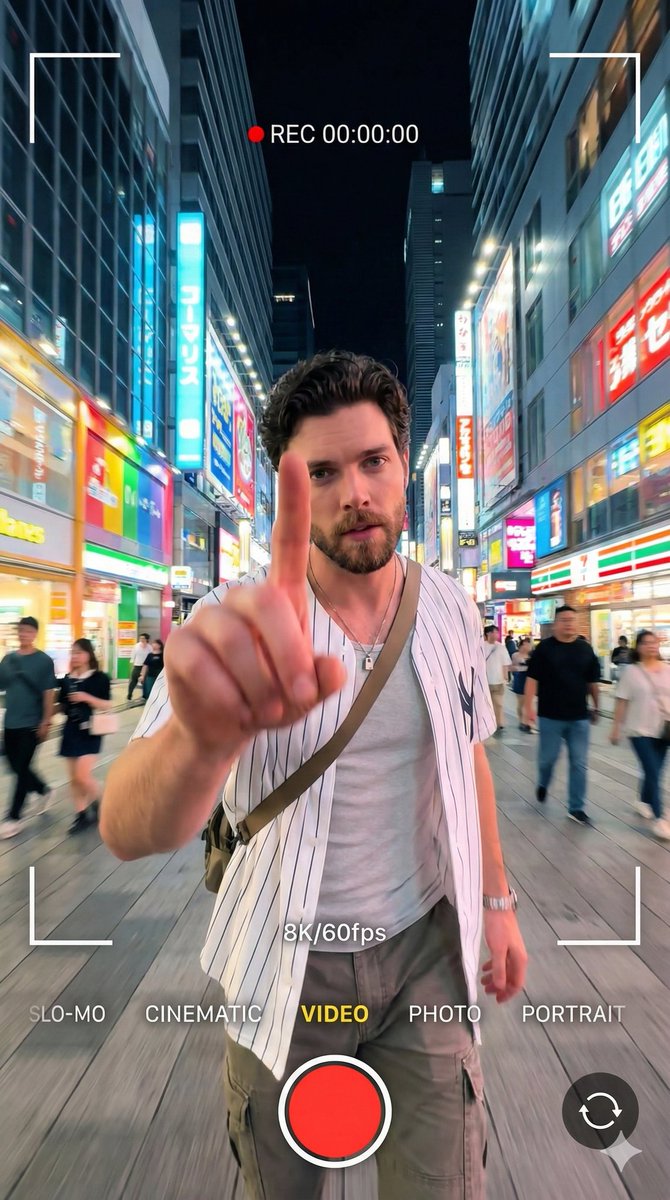
8K Cinematic Portrait with Video UI Overlays

8K Cinematic Portrait with Video UI Overlays

{ "prompt": "A 64K DSLR resolution portrait of a young man with short dark curly hair and a well-groomed beard, standing confidently in a bright neon-lit urban street at night. He is wearing a white striped baseball-style shirt, a light inner shirt, cargo pants, a necklace, and a crossbody bag. He is extending his index finger forward towards the camera lens in a dynamic gesture. The image features a smartphone video recording aesthetic with visible on-screen UI overlays: 'REC 00:00:00', '8K/60fps', frame brackets, and mode indicators like 'VIDEO' and 'CINEMATIC'. The background features colorful city lights and blurred passersby with a soft bokeh effect. Cinematic lighting, slight motion blur, wide-angle perspective. Octane render, Unreal Engine 5 style.", "negative_prompt": "cartoon, illustration, anime, low quality, pixelated, blurry, bad anatomy, deformed hands, extra fingers, missing limbs, bad proportions, watermark (except for requested UI overlays)", "aspect_ratio": "9:16", "width": 1080, "height": 1920, "model_version": "v6.0_or_latest" }

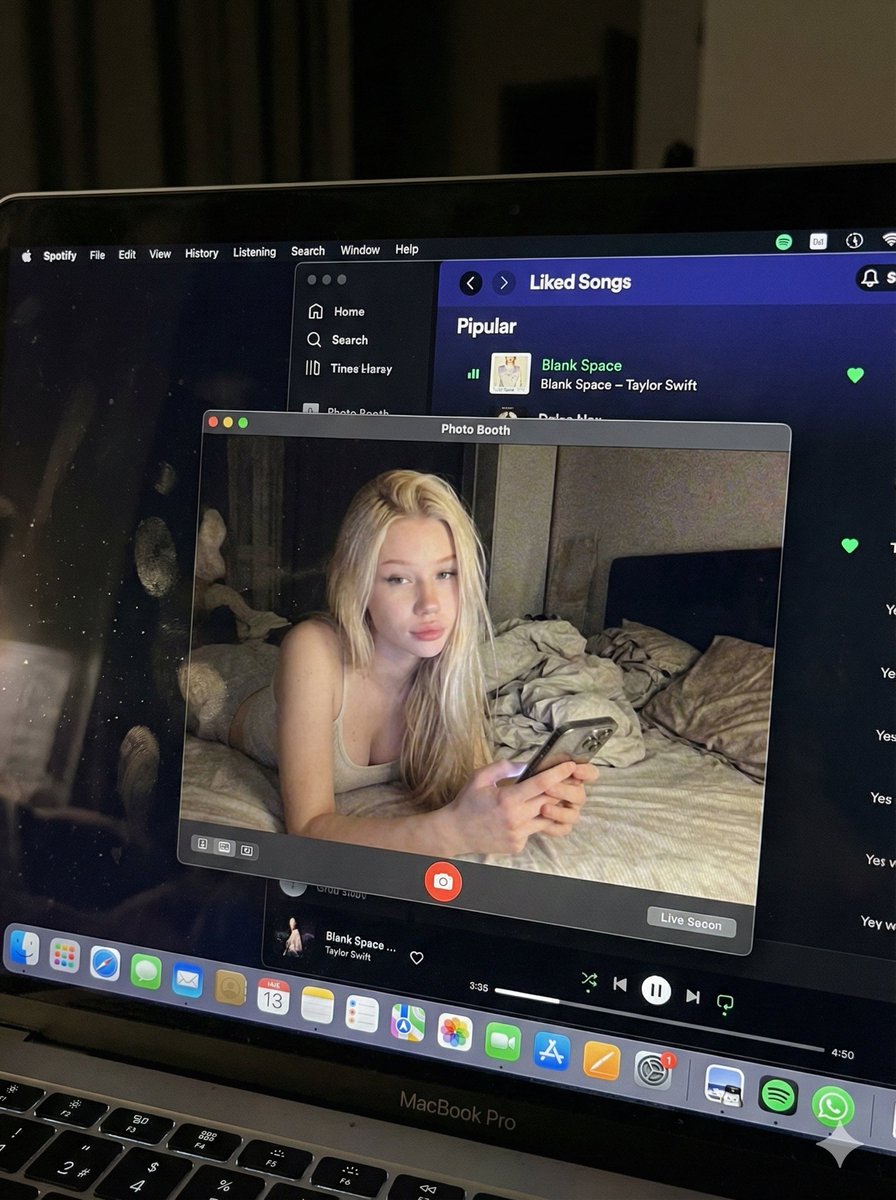
Photorealistic MacBook Screen POV Selfie Prompt

Photorealistic MacBook Screen POV Selfie Prompt

{ "image_settings": { "aspect_ratio": "3:4", "resolution": { "width": 1152, "height": 1536 } }, "prompt": { "identity_lock": { "reference": "{argument name="reference" default="input_photo"}", "preserve": [ "{argument name="preserve 1" default="face"}", "{argument name="preserve 2" default="facial proportions"}", "{argument name="preserve 3" default="eye shape"}", "{argument name="preserve 4" default="nose"}", "{argument name="preserve 5" default="lips"}", "{argument name="preserve 6" default="skin tone"}", "{argument name="preserve 7" default="skin texture"}", "{argument name="preserve 8" default="hairline"}", "{argument name="preserve 9" default="overall identity"}" ], "rules": [ "{argument name="rule 1" default="no face swap"}", "{argument name="rule 2" default="no beautify"}", "{argument name="rule 3" default="no smoothing"}", "{argument name="rule 4" default="no reshaping"}", "{argument name="rule 5" default="no AI look"}" ] }, "scene": { "camera_angle": "{argument name="camera angle" default="high-angle downward shot, POV"}", "composition": "{argument name="composition" default="MacBook screen fills most of the frame, thin strip of physical keyboard visible at the bottom"}", "screen_surface": [ "{argument name="screen surface 1" default="visible RGB pixel grid"}", "{argument name="screen surface 2" default="subtle moire effect"}", "{argument name="screen surface 3" default="micro dust on glass"}", "{argument name="screen surface 4" default="faint fingerprints"}", "{argument name="screen surface 5" default="soft ambient reflections"}" ] }, "digital_interface": { "os": "{argument name="os" default="macOS dark mode"}", "background_app": { "name": "{argument name="background app name" default="Spotify"}", "view": "{argument name="background app view" default="Liked Songs"}", "visible_tracks": [ "{argument name="track 1" default="Blank Space – Taylor Swift"}", "{argument name="track 2" default="Shake It Off – Taylor Swift"}", "{argument name="track 3" default="Cruel Summer – Taylor Swift"}", "{argument name="track 4" default="Love Story – Taylor Swift"}" ] }, "foreground_app": { "name": "{argument name="foreground app name" default="Photo Booth"}", "state": "{argument name="foreground app state" default="live preview window"}", "position": "{argument name="foreground app position" default="floating, center-right"}" } }, "photo_booth_content": { "environment": { "room": "{argument name="room" default="dim bedroom"}", "background": "{argument name="background" default="off-white wall, rumpled bedding"}", "lighting": "{argument name="lighting" default="low-light, nocturnal, cool screen glow mixed with warm skin tones"}" }, "subject": { "pose": "{argument name="subject pose" default="lying down, relaxed, candid"}", "expression": "{argument name="subject expression" default="natural, slightly relaxed"}", "outfit": "{argument name="subject outfit" default="light-colored tank top"}", "prop": { "item": "{argument name="prop item" default="iPhone 15 Pro"}", "hand": "{argument name="prop hand" default="right hand"}" } } }, "realism_rules": [ "{argument name="realism rule 1" default="this is a photo of a screen, not a screenshot"}", "{argument name="realism rule 2" default="raw smartphone photo look"}", "{argument name="realism rule 3" default="natural noise"}", "{argument name="realism rule 4" default="imperfect glass"}", "{argument name="realism rule 5" default="no studio lighting"}", "{argument name="realism rule 6" default="no HD polish"}" ] }, "negative_prompt": [ "{argument name="negative 1" default="screenshot"}", "{argument name="negative 2" default="flat UI"}", "{argument name="negative 3" default="perfect screen"}", "{argument name="negative 4" default="clean glass"}", "{argument name="negative 5" default="studio lighting"}", "{argument name="negative 6" default="beauty filter"}", "{argument name="negative 7" default="cartoon"}", "{argument name="negative 8" default="3d render"}", "{argument name="negative 9" default="painting"}", "{argument name="negative 10" default="watermark"}", "{argument name="negative 11" default="blurred face"}" ] }

Tokyo Time-Blend Split-Screen

Tokyo Time-Blend Split-Screen

Horizontal split-screen cinematic wide shot of {argument name="city" default="Tokyo city"} seamlessly blending two eras: {argument name="era 1" default="1920s"} on the left and {argument name="era 2" default="present day"} on the right, merging organically in the center with transitional materials and interactions between people from both times., "subject": "Tokyo city split between 1920s and present day with people interacting across eras", "environment": "Urban Tokyo streetscape transitioning from wooden machiya shops, tiled roofs, narrow alleys, rickshaws, vintage trams and paper lanterns on the left to glass-and-steel skyscrapers, neon-lit storefronts, elevated train lines, LED billboards, sleek cafes, bicycles, taxis and compact cars on the right; wet reflective pavement and blended center where gates, tracks and lighting morph into modern equivalents", "style": "photorealistic, cinematic, ultra-detailed, historically accurate period detail on left and crisp contemporary detail on right", "lighting": "mixed cinematic lighting: soft warm sepia fill on the 1920s left with subtle film-grain texture, cool neon backlight and high-contrast illumination on the present-day right, volumetric city fog and atmospheric particles across the scene, balanced color grading to preserve both eras", "camera": { "angle": "eye-level wide-angle", "distance": "wide shot (cinematic 4:3 composition)", "depth_of_field": "dynamic depth of field (selective focus across planes)", "focus": "primary focus on the midground center where era interactions occur, with layered focus into foreground and background details" }, "composition": { "framing": "horizontal split-screen blended composition, cinematic wide 4:3 framing", "subject_placement": "left half dominated by 1920s elements, right half by modern elements, central seam blended organically with key human interactions placed near center rule-of-thirds points", "foreground": "wet pavement reflections, close pedestrians from both eras, rickshaw wheel and modern bicycle tire, scattered period props newspapers and modern items smartphones", "background": "left: narrow alleys, vintage trams, tiled roofs and paper signs; right: elevated train lines, skyscrapers, LED billboards and neon storefronts; distant atmospheric fog and city lights unifying the skyline", "negative_space": "subtle open sky and upper building massing to avoid clutter while maintaining cinematic breadth" }, "mood": "cinematic, nostalgic on the left, vivid and energetic on the right, overall sense of curiosity and surprise from human interactions, narrative and time-travel intrigue", "color_palette": [ "sepia brown", "warm amber", "cool cyan", "neon magenta", "neutral concrete grays" ], "technical": { "render_type": "photorealistic photo", "post_processing": [] }

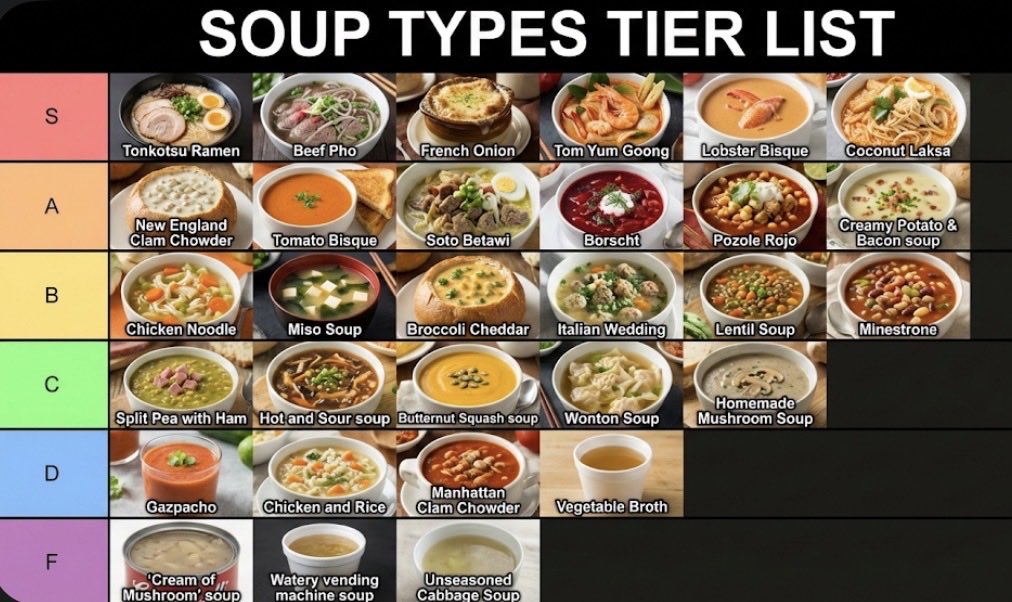
Two-Step Tier List Generation Prompt

Two-Step Tier List Generation Prompt

Make a json of a tier list (S-F scale) for: {argument name="category" default="[*insert-here*]"} Now generate image with the classically seen style/color scheme and representative thumbnail images for each list item

Viral Thumbnail: Excited pointing, avocado toast, “Done in 3 Minutes!”

Viral Thumbnail: Excited pointing, avocado toast, “Done in 3 Minutes!”

Design a viral video thumbnail using the person from Image 1. Face consistency: keep the person's facial features exactly the same as in Image 1, but change their expression so they look excited and surprised. Action: place the person on the left side, pointing their finger toward the right side of the frame. Subject: on the right side, place a high-quality image of a delicious {argument name="food" default="avocado toast"}. Graphics: add a bold yellow arrow connecting the person’s finger to the {argument name="subject" default="toast"}. Text: overlay massive, pop-style text in the middle: '{argument name="thumbnail text" default="Done in 3 mins!"}'. Use a thick white outline and drop shadow. Background: a blurred, bright {argument name="background scene" default="kitchen"} background with high saturation and contrast.

部分提示词收录自 X 平台创作者,版权归原作者所有。